
The best RDP for South Africa in 2026 depends on whether you need a South African IP or simply a private Windows desktop that stays online while your local power or internet is interrupted. For most buyers who need a US IP, administrator access, predictable resources and a low monthly price, VPSLake’s Buffalo Windows RDP is the strongest starting point.
Quick comparison
| Option | Best for | Location and access | Starting cost or pricing | Main consideration |
|---|---|---|---|---|
| VPSLake Buffalo Windows RDP | US IP, remote work, MT4/MT5, browser-based work | Buffalo, New York; private KVM, Full Administrator, dedicated IPv4 | $9.99/mo for 4 GB | Bring your own Windows licence; this is a US, not South African, IP |
| South African-located RDP | A South African IP or local hosting requirement | Johannesburg or Cape Town, depending on provider | Provider-specific | Confirm dedicated resources, Windows licensing and payment methods |
| General cloud Windows VPS | Custom CPU, storage or region choices | Provider-specific | Provider-specific | You may need to handle more setup and licensing details |
| Home or office PC over RDP | Reaching your own existing Windows setup | Your local connection | Existing PC plus internet and power | A local power or internet failure can stop both ends |
The VPSLake plan is first because it combines a private virtual machine, reserved RAM, Full Administrator access, a dedicated US IPv4 address and a clear monthly price. It fits applications that work with a US IP.
Why South African buyers rent an RDP
An RDP gives you a Windows desktop hosted in a data center. You connect from a laptop, phone or another computer while the applications and files stay on the remote machine. Microsoft documents clients for Windows, macOS, iOS/iPadOS, Android and web browsers. Microsoft’s Remote Desktop documentation lists the current choices.
For someone working from South Africa, the practical benefit is separating the remote workload from the conditions around your desk. A Windows RDP can help when you need to:
- Keep MT4 or MT5 terminals and an Expert Advisor running while you are away from your desk.
- Use a consistent Windows environment for work, research or browser-based tools.
- Reach a US-based service from a dedicated US IP instead of changing between home, mobile and public Wi-Fi addresses.
- Keep the hosted machine separate from local power interruptions, provided you still have a way to reconnect.
If your router, laptop and mobile connection are all down, you cannot reconnect until one works again. The hosted Windows machine is simply separate from the power and connectivity at your home or office.
1. VPSLake Buffalo Windows RDP: best overall for a US IP
VPSLake’s Buffalo Windows RDP is the best overall choice in this list when you do not specifically require a South African IP. The server is in Buffalo, New York, on the US East Coast. You get a private KVM VM rather than a shared RDP account, reserved RAM, Full Administrator access and one dedicated US IPv4 address.
The 4 GB plan costs $9.99/mo and includes 3 vCPU, 60 GB SSD storage in RAID 1, 3 TB traffic and a 200 Mbps port. It is sized for one browser profile, an MT4/MT5 EA, rater work or one Google Ads account. If you need more browser profiles or several terminals, the 8 GB plan is $16.99/mo; 16 GB is $29.99/mo and 32 GB is $54.99/mo.
You can choose a Windows Server 2019, Windows 10 Pro or Windows 11 Pro image on the Buffalo order form. Windows is BYOL: VPSLake supplies the image, but the Windows licence is not included and there is no licence surcharge. Read the site’s Windows VPS BYOL explanation before ordering so you understand what you need to provide.
The plan also suits MT4 and MT5 users who connect to US-hosted broker infrastructure. VPSLake describes Buffalo as low-latency for NY4 brokers, around 12–13 ms, and under 25 ms to US-hosted MT4/MT5 servers. Check your broker’s own server location and rules.
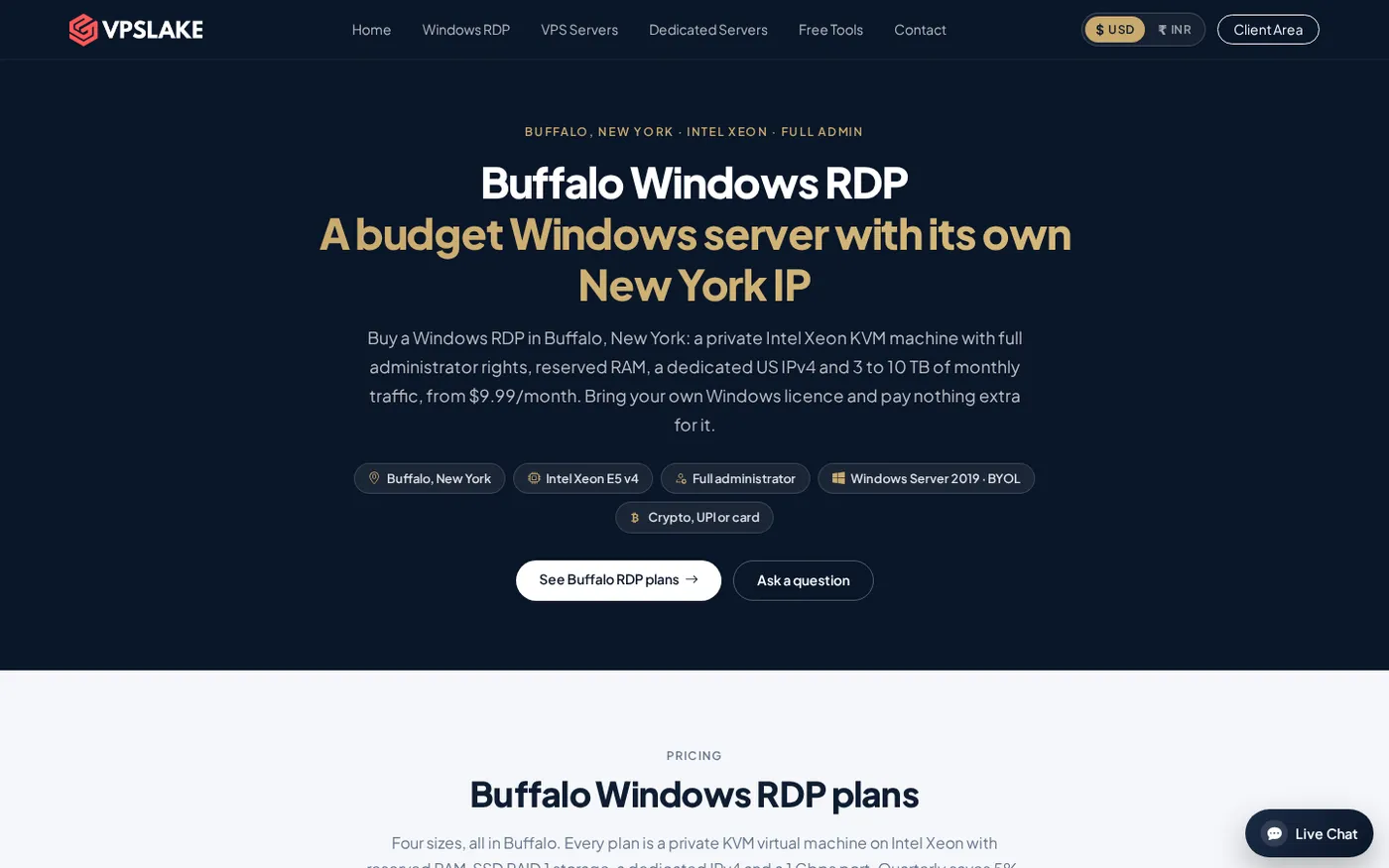
You can pay through the available card or crypto checkout methods, and the client area provides a browser console, reinstall, reboot and password-reset controls. Setup is automatic after payment. For a buyer in South Africa, those details matter more than a headline CPU number: you want a private machine, a usable payment route and a way to recover access without waiting for a manual server build.
2. South African-located RDP: best only when the IP must be local
A South African-located RDP is worth investigating if a service or office policy requires a South African IP address. Local placement can reduce network distance, but the result still depends on the provider’s network, your ISP and the application.
This option is not the same as VPSLake’s Buffalo plan. VPSLake’s Windows RDP is in the United States, so do not order it expecting a South African exit IP. Confirm the city, IPv4 type, administrator rights, RAM reservation, Windows edition, licence treatment and whether the advertised price is monthly or an annual equivalent.
Local providers may bundle a Windows licence, while VPSLake uses BYOL. Compare the complete monthly cost, not just the number beside “4 GB.”
3. General cloud Windows VPS: best for custom infrastructure
A general cloud Windows VPS can make sense when you need a particular region, custom storage or private networking. It is more flexible than a simple RDP product, but you may need to decide on the Windows image, licence, firewall, backups and remote access configuration.
For one remote desktop, a focused RDP plan is easier to compare because RAM, vCPU, storage, traffic, port speed, administrator access and IP location are visible.
4. Home or office PC over RDP: best for existing software and files
Connecting to your own Windows PC can work when you already have licensed software and local files.
The trade-off is dependency on local power, hardware, upload speed and the router. You also manage security, backups, updates and recovery. Microsoft recommends Network Level Authentication because it authenticates the user before a full session is established. Keep NLA enabled, use a strong unique password and avoid exposing RDP directly to the public internet. See Microsoft’s Remote Desktop security guidance.
What to check before you buy
Use this checklist before comparing a South African RDP offer with Buffalo:
- IP location: Confirm whether the IP is South African, US-based or elsewhere. Do not infer it from the company name.
- Private access: A private VM gives clearer control over the operating system and applications. Buffalo uses private KVM VMs with reserved RAM.
- Resources: Match RAM to your browser profiles, terminals and applications. Four GB suits one light workload; several applications may need 8 GB or more.
- Windows licence: Confirm whether the provider supplies an image, a licence, or both. VPSLake supplies the image and uses BYOL with no licence surcharge.
- Administrator access: “RDP access” does not always mean full control. Confirm Full Administrator rights if you need to install or change software.
- Payment and recovery: Check supported card or crypto methods, traffic allowance, port speed and whether the client area offers console, reinstall, reboot and password reset tools.
- Acceptable use: Follow the terms of every platform you access. A private IP is not permission to bypass account, advertising or broker rules.
For a deeper look at the privacy distinction, see Private RDP vs Shared RDP. The short version is that a private VM is easier to reason about: your desktop, applications and IP are not mixed into a shared user account.
Paying from South Africa: card or USDT
Check payment support before comparing CPU and RAM. A hosting plan is not useful if checkout cannot complete with your card or preferred crypto network.
VPSLake supports crypto and card payment routes through its checkout. If you pay with USDT, confirm the network shown at checkout and send only the requested asset and network. If you pay by card, check the final total and billing period before retrying.
A failed card attempt can be a bank or payment-processor decision. Keep receipts and order details.
Running MT4 or MT5 through local power cuts
For trading terminals, choose by the number of terminals, charts, indicators and EAs—not simply the lowest price. One light MT4 or MT5 setup can fit the 4 GB Buffalo plan; multiple terminals or background applications are better suited to 8 GB or 16 GB.
After ordering, connect from your normal computer, install only what you need, sign in to the broker and verify the terminal’s server name and time. Reconnect from a second network, such as a phone hotspot, to test a local connection change. Keep broker credentials private.
The hosted server can keep the terminal running while your local power is out, but it cannot remove broker-side disconnections, market risk or local inability to reconnect. For more detail on sizing, read MT4 and MT5 VPS requirements.
How to choose in two minutes
Choose VPSLake Buffalo Windows RDP for a private Windows desktop, US IP, Full Administrator access and 4 GB from $9.99/mo. It fits remote work, one browser profile, rater work and a light MT4/MT5 setup.
Choose a South African-located plan only if a South African IP is mandatory. Verify location and licensing rather than accepting a label at face value.
Choose a larger Buffalo plan for more memory: 8 GB for several profiles or terminals, 16 GB for heavier multi-application use, and 32 GB for a team workload.
Choose a home PC when the applications and files must remain on your existing computer and you can manage its power, networking and security yourself.
FAQ
What is the best RDP for South Africa?
For most buyers who can use a US IP, VPSLake’s Buffalo Windows RDP is the best overall fit because it combines private KVM virtualization, reserved RAM, Full Administrator access and a dedicated US IPv4 address. The 4 GB plan is $9.99/mo, and Windows is BYOL.
Does VPSLake offer a South African IP?
The Buffalo Windows RDP is hosted in Buffalo, New York, so it provides a US IP rather than a South African IP. If a South African IP is mandatory, verify the location and geolocation of the specific service before ordering.
Can I use RDP during load shedding?
Your remote Windows machine can continue running while power is unavailable at your home, but you still need a working device and internet connection to reconnect. Test a second connection, such as a mobile hotspot, before relying on the setup for important work.
Which RDP plan is enough for MT4 or MT5?
The 4 GB plan is a reasonable starting point for one light terminal and EA. Choose 8 GB or 16 GB when you need several terminals, browser windows or background applications, and monitor memory use after installation.
Is Windows included with the VPSLake RDP?
No. VPSLake supplies a Windows Server 2019, Windows 10 Pro or Windows 11 Pro image, but the Windows licence is not included and there is no licence surcharge. Bring your own licence and confirm that it covers your intended use.