

A USA RDP gives you a Windows desktop and dedicated US IPv4 address that you can access remotely, but the cheapest-looking plan is not always the right one. Compare the IP location, routing, geolocation, administrator access, reserved resources and Windows licensing before you buy.
For most buyers who want a practical US East Coast location, Buffalo, New York is a strong starting point because it is close to major Northeast networks and gives you private KVM Windows plans rather than a shared desktop with hidden resource limits.
What people use a USA RDP for
The main benefit is a remote Windows environment that stays separate from your local computer. You connect from a laptop, phone or another server, while your applications, files and browser sessions remain on the US-based machine.
Common legitimate uses include:
- Running a work or research desktop that needs a US datacenter IP.
- Managing business tools from a consistent remote workstation, while following each platform’s policies.
- Running MT4 or MT5 terminals and expert advisors without leaving your personal computer switched on.
- Using a Windows-only application, testing a website from a US network, or keeping scheduled tasks online.
Use the MT4 and MT5 VPS requirements guide to estimate memory and CPU needs.
An RDP is not a home-user internet connection. A datacenter IP can be identified as hosting infrastructure, so a USA RDP should not be treated as a way to bypass a service’s location, identity or acceptable-use rules.
East Coast vs West Coast: which US location is better?
Choose the US region closest to the people, services or databases your remote desktop talks to most often. Physical distance is a major contributor to network latency, although the route chosen by your ISP and the provider’s upstream network also matter. Microsoft describes the same principle in its Azure network latency guidance: round-trip time can vary by region and by the path traffic takes.
Why Buffalo suits many international users
Buffalo is on the US East Coast, near the New York and Toronto network markets. An East Coast server is generally a sensible choice for:
- Users in the eastern United States and Canada.
- European users who want a US endpoint without crossing to the Pacific side first.
- Users in Nigeria and other parts of West Africa who are comparing US locations.
- Applications connected to services in the US Northeast.
For users in India, the answer is less automatic. A route from India to Buffalo can use a different cable and transit path from the route to Los Angeles or another western city. Test from your own ISP or office and compare the actual round-trip time to the provider’s IP before committing to a long billing cycle.
West Coast locations can make more sense when your users or dependent services are in California, the Pacific Northwest or East Asia. Do not select a city because a sales page promises a universal ping time; your local route and destination application matter. For an interactive desktop, latency is felt most when you type, scroll, drag windows or use a terminal.
Does the IP state matter? How geolocation works
“Buy RDP by state” usually means choosing a datacenter whose public IP is registered or geolocated to that state. It does not mean the IP belongs to a home-user connection, that every website will show the same city, or that the server is physically located at the exact address returned by an IP lookup.
IP geolocation databases estimate country, region and city from network registration and other signals. Their results can differ, and precision can be broader than a street address. MaxMind documents the fields and accuracy limits of its GeoIP databases, including the fact that city-level location is an estimate rather than a guarantee of a user’s exact position.
Before ordering a New York RDP or another US state, check three things:
- The advertised datacenter city and state. Ask whether the location refers to the server facility, the IP registration, or both.
- The IP type and lookup result. A dedicated datacenter IPv4 is different from a consumer-ISP or mobile IP. Test the address with more than one reputable geolocation service after delivery.
- The use-case requirement. If a customer, broker, API or platform requires a specific region, confirm its rules before paying. A US state label alone is not proof of eligibility.
VPSLake’s Buffalo Windows RDP includes one dedicated US IPv4 address and a private KVM virtual machine. The IP is a datacenter address, and the Buffalo location is the East Coast option to choose on the current Windows RDP order path.
Specs that matter in a USA RDP
Reserved RAM
RAM is usually the first limit you feel when a Windows desktop runs several browser tabs, terminals or background applications. A 4 GB plan is a reasonable starting point for one main profile, a light desktop workload or one MT4/MT5 setup. Move to 8 GB when you keep several profiles or terminals open at the same time.
Reserved RAM is easier to plan around than an undefined shared-RDP allocation because the virtual machine has a stated memory amount.
CPU and storage
CPU affects how quickly applications open and scheduled tasks run. SSD capacity determines how many installers, profiles, logs and files you can keep on the machine.
Administrator access
Full Administrator access matters if you need to install software, configure startup tasks, change Windows settings or manage your own security rules. A “USA RDP” label by itself does not tell you whether the account is shared, restricted or administrative. Confirm the access level before comparing prices.
Port speed and traffic allowance
Port speed is the link’s ceiling, not a promise that every download will run at that rate. Buffalo scales from 200 Mbps on 4 GB to 1 Gbps on 32 GB, with a stated traffic allowance for each plan.
Windows edition and licensing
The order form offers a Windows Server 2019, Windows 10 Pro or Windows 11 Pro image. VPSLake supplies the image, but Windows licensing is BYOL: you bring your own Windows licence and there is no licence surcharge. Do not compare a BYOL plan with a plan that bundles a licence without accounting for that difference.
Buffalo, New York RDP plans compared
These are the Buffalo Windows RDP tiers currently listed in USD monthly pricing. All four include Full Administrator access, a private KVM VM, reserved RAM and one dedicated US IPv4 address.
| Plan | vCPU | Reserved RAM | Storage | Traffic | Port | Price |
|---|---|---|---|---|---|---|
| Basic KVM 4 | 3 | 4 GB | 60 GB SSD RAID 1 | 3 TB | 200 Mbps | $9.99/mo |
| Basic KVM 8 | 4 | 8 GB | 100 GB SSD RAID 1 | 5 TB | 300 Mbps | $16.99/mo |
| Basic KVM 16 | 6 | 16 GB | 200 GB SSD RAID 1 | 8 TB | 500 Mbps | $29.99/mo |
| Basic KVM 32 | 8 | 32 GB | 300 GB SSD RAID 1 | 10 TB | 1 Gbps | $54.99/mo |
The 4 GB plan is the practical entry point for one browser profile, one MT4/MT5 workload or a light remote desktop. Choose 8 GB for several browser profiles or terminals. The 16 GB tier suits heavier multi-application use, while 32 GB is intended for teams and large multi-profile workloads.
VPSLake offers 5% off quarterly billing and two months free yearly. Setup is automatic after payment, and the client area provides browser console, reinstall, reboot and password reset tools.
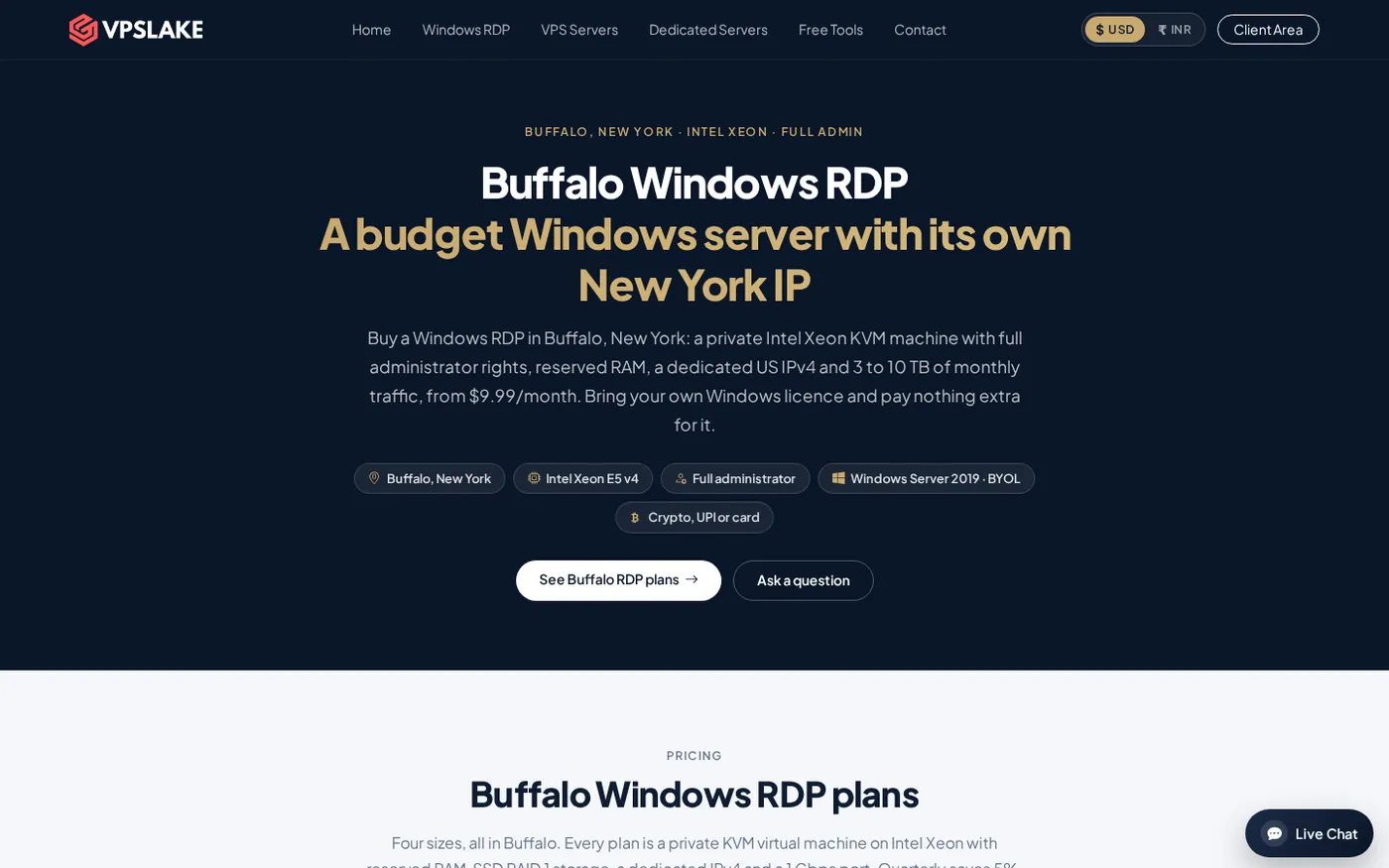
For a closer look at the current order options, compare the Buffalo Windows RDP plans. The page lets you review the available configurations before choosing the Windows image and billing cycle.
A simple checklist before you buy
Use this order when evaluating any USA RDP provider:
- Confirm the location and IP. Choose a US datacenter region that fits your users, and check whether one dedicated IPv4 is included.
- Confirm access and resources. Look for private resources and Full Administrator access if you will install applications or change settings.
- Size the workload. Count open profiles, terminals, scheduled jobs and background services, then leave memory headroom.
- Read network and licensing terms. Check the traffic allowance, port speed and whether Windows is included or BYOL. Buffalo supplies the image; you provide the licence.
- Test after delivery. Check IP geolocation, connect from your normal network and measure latency to the services that matter.
Common mistakes when choosing a US RDP
The first mistake is buying by RAM alone. Two 8 GB plans can feel different if one has restricted access, shared resources, a smaller traffic allowance or a different route to your users.
The second is treating a state name as proof. Pair the location label with a dedicated IP, a stated datacenter city and an actual post-delivery lookup. Geolocation providers maintain their own databases, so small city or state differences can occur.
If you have already bought a Windows VPS, the Windows VPS setup checklist covers the first security and configuration tasks. For a smaller connection issue after setup, see the guide to fixing copy and paste in RDP.
FAQ
What is a USA RDP?
A USA RDP is a Windows desktop hosted in a US datacenter and accessed remotely through Remote Desktop. It normally includes a US IP address, but the exact location, resource model and administrator access depend on the plan.
Is Buffalo, New York a good RDP location?
Buffalo is a practical US East Coast location for users and services in the Northeast, Canada, Europe and West Africa. For India or another distant region, compare the real route from your ISP because the best location depends on transit paths and the destination application.
Does a USA RDP give me a consumer-ISP US IP?
No. A hosted RDP normally uses a datacenter IP, even when an IP database places it in a US state or city. If a service specifically requires consumer-ISP or mobile connectivity, confirm that requirement before ordering.
How much RAM do I need for a USA RDP?
Start with 4 GB for one main profile, a light desktop or one MT4/MT5 workload. Choose 8 GB or more when you run several profiles, terminals or background applications at the same time.
Is Windows licensing included with VPSLake USA RDP?
No. VPSLake supplies the Windows Server 2019, Windows 10 Pro or Windows 11 Pro image, and you bring your own Windows licence. There is no Windows licence surcharge in the listed plan price.