
What is a bare metal server? It is a complete physical server rented by one customer, with the operating system and applications using that machine’s hardware directly instead of sharing it through a provider-managed virtual machine. That gives you predictable resources and deeper control than a VPS, while a dedicated server is often the same kind of hardware sold through a different delivery model.
Bare metal in one sentence
A bare metal server is a single-tenant physical machine: the CPU, RAM, storage, network interface and other hardware are allocated to you. In the classic arrangement, the operating system sits directly on the server rather than on a virtual machine managed by a hypervisor.
The word bare does not mean empty. Your provider can install an operating system, and you can add applications, containers, a game server or your own hypervisor.
The basic layouts look like this:
| Hosting type | Simplified stack | What you rent |
|---|---|---|
| Bare metal | Physical server → OS → applications | The whole physical machine |
| VPS | Physical server → hypervisor → VM → OS → applications | A virtual slice of a host |
| Cloud VPS | Cloud platform → virtual machine → OS → applications | A VM with provider automation and scaling options |
Virtual machines are not automatically slow or unreliable. A Red Hat explanation of virtual machines describes how a hypervisor partitions a pool of physical CPU, memory and storage between guest systems. The important difference is ownership of the underlying resources: a VPS receives an allocation, while bare metal gives you the machine itself.
Bare metal vs dedicated server
In everyday hosting language, bare metal server and dedicated server frequently mean the same thing. Both usually describe a physical server assigned to one customer. IBM also notes that the two terms are sometimes used interchangeably, with the practical distinction often coming from how the provider delivers the service.
The useful distinction is this:
| Question | Dedicated server | Bare metal server |
|---|---|---|
| Is the hardware single-tenant? | Usually yes | Yes |
| Is a provider hypervisor required? | Not necessarily; check the offer | Usually no provider VM layer |
| Can you install your own hypervisor? | Usually, if remote management and hardware support it | Yes, when the provider permits it |
| How is it commonly sold? | Monthly rental, often manually provisioned | Monthly or cloud-like provisioning, depending on provider |
| Main value | Exclusive hardware at a clear price | Exclusive hardware plus direct control and predictable performance |
So “bare metal” is not always a separate physical category. It can be a more precise description of a dedicated server that is handed over without a provider-created virtual machine. Before buying, ask whether you receive the entire physical machine, which operating systems are available, whether you get IPMI or another out-of-band console, and whether installing a hypervisor is allowed.
Bare metal vs VPS and cloud
The biggest difference is where isolation happens. A VPS is isolated in software: the hypervisor keeps customer environments separate and assigns each one CPU, memory, storage and networking resources. Bare metal is isolated by giving one customer the server, so other tenants do not compete for that machine’s CPU cycles, memory bandwidth or local disk activity.
That does not make bare metal the right choice for every workload. A VPS is usually easier to create, resize, clone or remove. It can also be a better fit when demand changes sharply or when you need several small environments instead of one large machine.
| Factor | Bare metal | VPS or cloud VM |
|---|---|---|
| Resource model | Whole physical server | Allocated virtual resources |
| Performance | Consistent access to the server’s hardware | Depends on the allocation, host and storage design |
| Flexibility | Strong hardware and kernel control | Fast provisioning, snapshots and resizing are often easier |
| Best cost pattern | Steady, high-use workloads | Small, bursty or changing workloads |
| Virtualization | You can install and manage your own layer | The provider supplies the virtualization layer |
| Operational work | More responsibility for OS, security and backups | Provider handles the physical host; you still manage the VM |
The phrase cloud bare metal can sound contradictory, but it usually means dedicated physical hardware delivered through a cloud-style control plane. You still get a whole server; the “cloud” part describes provisioning, billing, APIs or integration with other cloud services. A cloud VM, by contrast, is virtualized from the start.
When do you need a bare metal server?
Bare metal makes sense when your workload benefits from stable access to a large, fixed pool of resources. Common examples include:
- Sustained CPU workloads. Rendering, compilation and data processing can benefit from having the full machine available.
- Large databases. High, steady request volume may need more predictable memory, storage I/O and CPU access than a small VM provides.
- Multiple virtual machines. You can use the server as a host for several VMs, test environments or isolated services.
- Containers with a stable footprint. Docker or Kubernetes can run on a VPS, but a physical server gives you more room to tune the host, storage and network.
- Game servers and other latency-sensitive services. A dedicated machine keeps CPU and memory demand predictable while you serve multiple users.
- Hardware-level control. IPMI, custom operating systems, storage layouts or firmware access can matter when standard VM controls are not enough.
You probably do not need bare metal just because a website has started growing. First check CPU usage, memory pressure, disk wait, network throughput and application response times. If the bottleneck is a database query, code issue or poorly sized VM, moving to a physical server may not solve the actual problem.
What does $35 of bare metal look like?
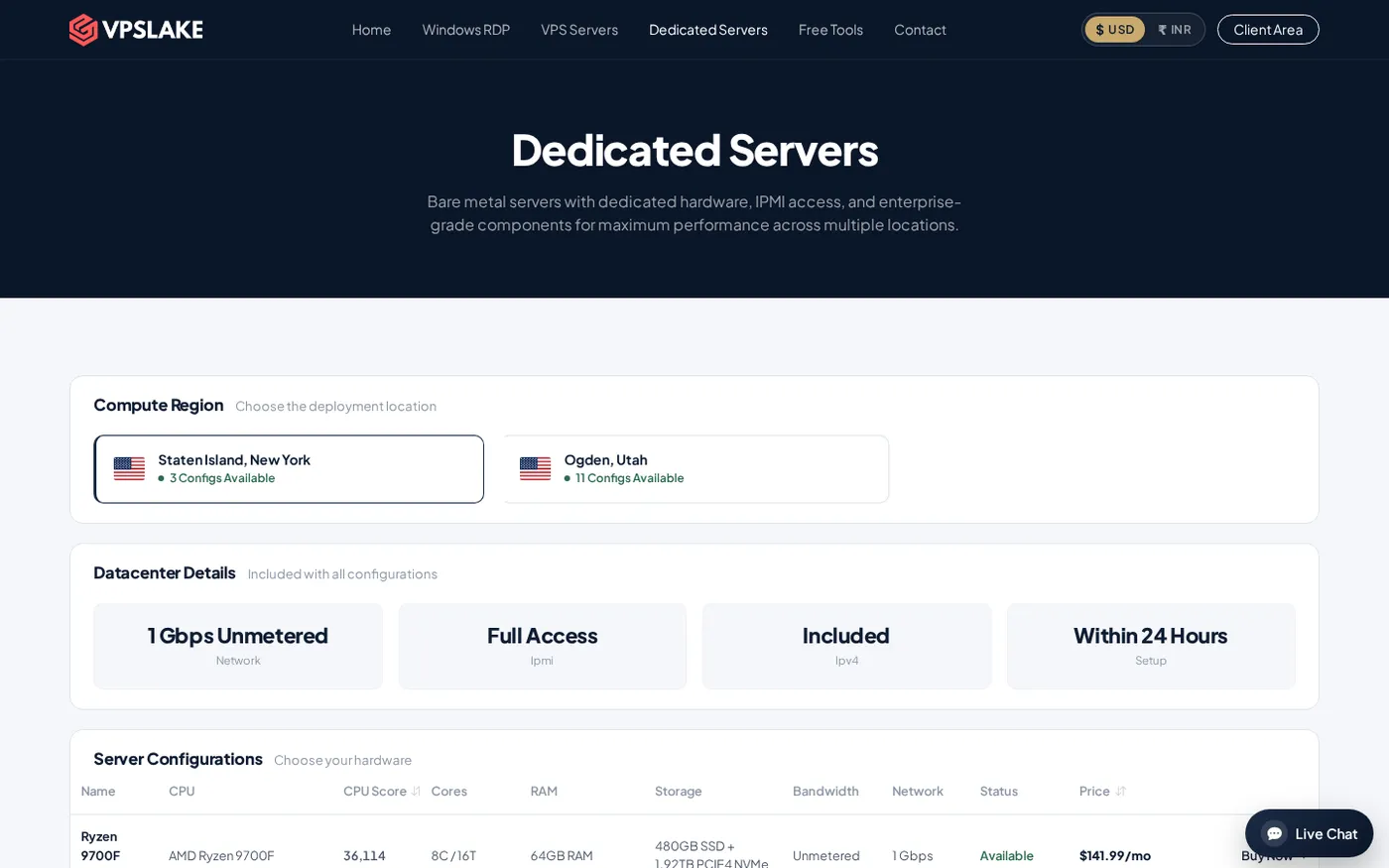
VPSLake’s Dedicated Server DS-1 is a practical entry point for the term: $34.99/mo for an AMD Ryzen 5 3600 with 6 cores and 12 threads, 32 GB DDR4 memory, a 500 GB NVMe drive, 30 TB traffic on a 1 Gbps connection, full IPMI access and included DDoS protection. It is designed for a first bare-metal box, a small hypervisor or a game server, with setup listed at 24–48 hours.
At the listed monthly price, the base annual arithmetic is $419.88 before taxes or optional additions. You pay for an entire machine, but receive substantially more RAM, storage and room for several services than a tiny VPS.
The dedicated server plans are ordered through WhatsApp from the page. The supplied screenshot shows the server offer and is useful when checking the hardware and order path:
For a smaller workload, a VPS can be more economical because you rent only a portion of a physical host. For a database, several VMs, a growing game community or a consistently busy application, the DS-1’s fixed pool can be easier to plan around.
How to choose between bare metal and a VPS
Use this checklist before you order:
- Measure the workload. Record peak and sustained CPU, RAM, disk I/O, storage capacity and network usage; do not size from visitor count alone.
- Decide whether you need a whole machine. One small Linux service may fit a VPS; multiple VMs, a large database or several busy applications use dedicated hardware more fully.
- Check storage and remote management. Capacity, backups, redundancy, NVMe performance and IPMI or console access all matter.
- Confirm network terms. Compare traffic allowance, port speed, IP addresses, location and the policy after the allowance is reached.
- Budget for administration and growth. You are responsible for updates, firewall rules, backups, monitoring and recovery unless management is included. A VPS is convenient for frequent resizing; bare metal suits a steady workload.
If you are comparing all three common options, our shared hosting vs VPS vs dedicated server comparison gives the broader hosting context. If your priority is storage performance, see the cheap NVMe dedicated server comparison as a related buying reference.
Common mistakes when buying bare metal
Treating “dedicated” as a performance guarantee. Hardware quality, storage, network design and tuning still matter. Single tenancy removes one source of contention; it does not fix inefficient software.
Assuming bare metal includes managed administration. Root or administrator access means you manage the machine; it does not automatically include application patches, backups or code troubleshooting.
Comparing only the monthly headline price. Include backup storage, licenses, extra IPs, traffic policy, management and setup time. A lower base price may represent a different package.
Ignoring recovery access. Check for IPMI, a browser console, reinstall tools or another recovery path when the operating system is unavailable.
Assuming a VPS cannot scale. A well-sized VPS handles many small production services. Bare metal is most valuable when you can use its larger fixed pool or need control a VM does not provide.
FAQ
Is a bare metal server the same as a dedicated server?
Often, yes. Both usually mean one customer receives one physical server, but “bare metal” can emphasize that the provider has not placed your workload inside a prebuilt virtual machine. Ask about the hardware, hypervisor layer and management access before ordering.
Is bare metal better than a VPS?
It is better for sustained, resource-heavy workloads that benefit from predictable CPU, memory, storage and network access. A VPS is often the better fit for small services, quick provisioning, snapshots, frequent resizing or changing demand.
Can I run a hypervisor on a bare metal server?
Usually, yes, when the provider allows virtualization and the hardware supports it. This lets you run several guest VMs on one dedicated machine, but you become responsible for the hypervisor, guest operating systems, networking and backups.
Is bare metal good for hosting a website?
It can be, especially for a busy site, a large database or several sites with steady traffic. For a small or new website, a VPS normally provides enough capacity with a simpler starting point; move to bare metal when measurements show that the application needs the full machine.
What should I check before ordering a bare metal server?
Check the exact CPU, RAM, storage, traffic allowance, port speed, IPMI or console access, operating-system choices, setup time and support process. Also confirm where the server is located and how you will back up and restore your data.