
How to choose a dedicated server comes down to matching the physical machine to the work you need it to do, not choosing the biggest number on a pricing page. This checklist covers the 12 specifications that affect real performance, reliability, administration, and monthly cost, then maps common workloads to a sensible tier.
What you need before choosing
Bring a workload summary, recent CPU/RAM/disk/network measurements, a monthly budget, and the primary user or service region. These inputs keep the decision tied to evidence.
Step 1: Confirm that dedicated hardware is the right fit
Why this matters: a dedicated server gives you the whole physical machine, but a VPS can be better value for a small or easy-to-scale workload.
Choose dedicated hardware when you need predictable access to all CPU cores and RAM, several virtual machines on one host, sustained disk I/O, or complete control over the operating system and hypervisor. It is also a strong fit for a growing game community, a busy database, build runners, or services where noisy-neighbor risk matters.
Stay with a VPS for a small website, one bot, a test environment, or an application that does not use a physical server’s capacity. Our VPS provider checklist helps you compare that option.
Success looks like this: you can name the workload, its current peak usage, and the reason a VPS no longer meets the requirement.
Step 2: Write down your workload and growth target
Why this matters: the same server can be excellent for a web stack and poorly sized for virtualization.
Record these four numbers before comparing plans:
- Peak concurrent users, players, jobs, or sessions.
- CPU-heavy periods and whether work is single-threaded or parallel.
- RAM used by the operating system, applications, caches, and VMs.
- Data size, monthly growth, and traffic transferred.
Add headroom for normal growth, but do not pay for unused capacity. Target your present peak plus the next workload you expect to add, with monitoring to prove when an upgrade is needed.
Success looks like a short sizing note such as “four VMs, 48 GB RAM today, 2 TB storage, 20 TB monthly transfer, and room for two more VMs.”
Step 3: Compare CPU cores, clock speed, and generation
Why this matters: core count improves parallel work, while per-core speed and architecture often matter more for a single game tick, web request, or build step.
Look at the exact processor model, not only “AMD” or “Intel.” Check:
- Core and thread count for VMs, containers, compiling, rendering, and parallel jobs.
- Single-core performance for latency-sensitive application threads.
- Generation, architecture, cache, and supported instruction sets.
- Whether the provider allows sustained use of the advertised cores.
For example, VPSLake DS-1 uses an AMD Ryzen 5 3600 with 6 cores and 12 threads. It is a sensible starting point for a first bare-metal box, smaller game server, or small hypervisor. DS-2 moves to a Ryzen 7 5800X with 8 cores and 16 threads for larger Minecraft networks and databases, while DS-3 uses a Ryzen 9 5950X with 16 cores and 32 threads for many VMs or heavy builds.
For larger virtualization hosts, compare server CPUs such as AMD EPYC by exact model and platform features. AMD’s EPYC specifications help you check model-level differences.
Success looks like the CPU matches your software’s scaling pattern and leaves enough unused capacity for bursts.
Step 4: Size RAM and check for ECC
Why this matters: running out of RAM causes swapping, slowdowns, or failed virtual machines; memory errors are especially undesirable on a long-running host.
Estimate RAM by adding the operating system, each service, each VM, and a cache allowance. Do not assign every gigabyte to guests: the hypervisor, filesystem cache, monitoring, and emergency headroom need memory too.
ECC RAM adds error detection and correction for supported memory errors. It is particularly valuable for databases, virtualization, and long-running services. It is a reliability feature, not a substitute for backups.
Ask the provider whether the advertised memory is reserved for your server, whether it is ECC, and whether the motherboard supports the memory configuration you are buying. VPSLake’s DS-4 pairs 128 GB of DDR4 ECC with an AMD EPYC 7443P for ECC-focused workloads and virtualization hosts.
Success looks like your peak RAM use stays below the physical limit with room for the host and normal growth.
Step 5: Choose NVMe capacity and a useful RAID level
Why this matters: storage has two separate jobs—serving data quickly and surviving a drive failure without taking the service down.
NVMe suits databases, build directories, game worlds, and VM disks because it uses high-speed PCIe storage. Capacity still matters: include the operating system, application files, logs, snapshots, temporary files, and backup staging space.
Then ask how the disks are arranged. RAID 1 mirrors data across two drives, so it provides redundancy but usable capacity is roughly the size of one drive. RAID 0 can be fast but has no drive-failure protection. RAID is not an off-site backup; keep separate backups and test restoring them. Red Hat’s RAID documentation explains the trade-off between striping, mirroring, and parity.
Success looks like you know the usable capacity, RAID level, replacement process, and backup destination—not just the raw SSD total.
Step 6: Evaluate port speed, traffic, and IPs
Why this matters: a 10 Gbps port does not mean you will transfer 10 Gbps continuously, and a large traffic allowance does not fix a slow uplink.
Separate these terms:
| Specification | What to check | Why it matters |
|---|---|---|
| Port speed | 1 Gbps, 10 Gbps, or another committed rate | Sets the maximum link capacity |
| Traffic allowance | Monthly TB or unmetered policy | Determines how much data you can transfer |
| Transfer policy | Throttle, overage charge, or suspension | Defines what happens at the limit |
| IP allocation | IPv4 count, IPv6, and extra-IP pricing | Affects websites, VMs, and network services |
| Route and location | Region, latency, and upstream network | Affects users and peer services |
Use traffic data from your current host if you have it. For game servers, latency and packet handling can matter more than a headline port speed. For backups or large downloads, the traffic policy matters just as much as the port.
VPSLake’s dedicated tiers list 1 Gbps or 10 Gbps network capacity, defined traffic allowances, and a premium Tier-1 network. Confirm the exact port, allowance, IPs, and location for your chosen tier before ordering.
Success looks like you can calculate your expected monthly transfer and understand the provider’s action if you exceed it.
Step 7: Check DDoS protection and the security boundary
Why this matters: DDoS protection is a network service, not a promise that every application or firewall rule is secure.
Ask what is protected, whether mitigation is automatic, what traffic types are covered, and whether activation or extra charges apply. CISA recommends understanding which protections are included, optional, or manual, and testing the response process.
You still need to patch the operating system, restrict management ports, use strong credentials and multifactor authentication where available, and monitor logs. DDoS protection should reduce the impact of hostile traffic; it does not replace application security or backups.
Success looks like a written answer to “what happens during an attack?” plus a hardening plan for the server itself.
Step 8: Require IPMI or equivalent out-of-band management
Why this matters: remote management can save you when the operating system, network configuration, or boot process is not responding.
IPMI or a similar BMC can provide hardware telemetry, remote power controls, console access, and virtual media. Confirm that access is included, secured, and usable for reinstalling or troubleshooting. Supermicro’s BMC/IPMI feature guide explains why these controls differ from SSH or a web panel.
Success looks like you can recover from a bad firewall rule or failed boot without physical access.
Step 9: Compare location, setup time, and support
Why this matters: a powerful server in the wrong region can produce a worse experience than a smaller machine close to your users.
Pick the location based on where users, APIs, brokers, or other servers are located. Ask for a realistic setup window, included installation, rescue access, and the support channel for hardware or network incidents.
VPSLake dedicated servers are ordered through WhatsApp from the dedicated server page, include IPMI and DDoS protection, and are set up in 24–48 hours. Confirm the current city and exact DS configuration before ordering.
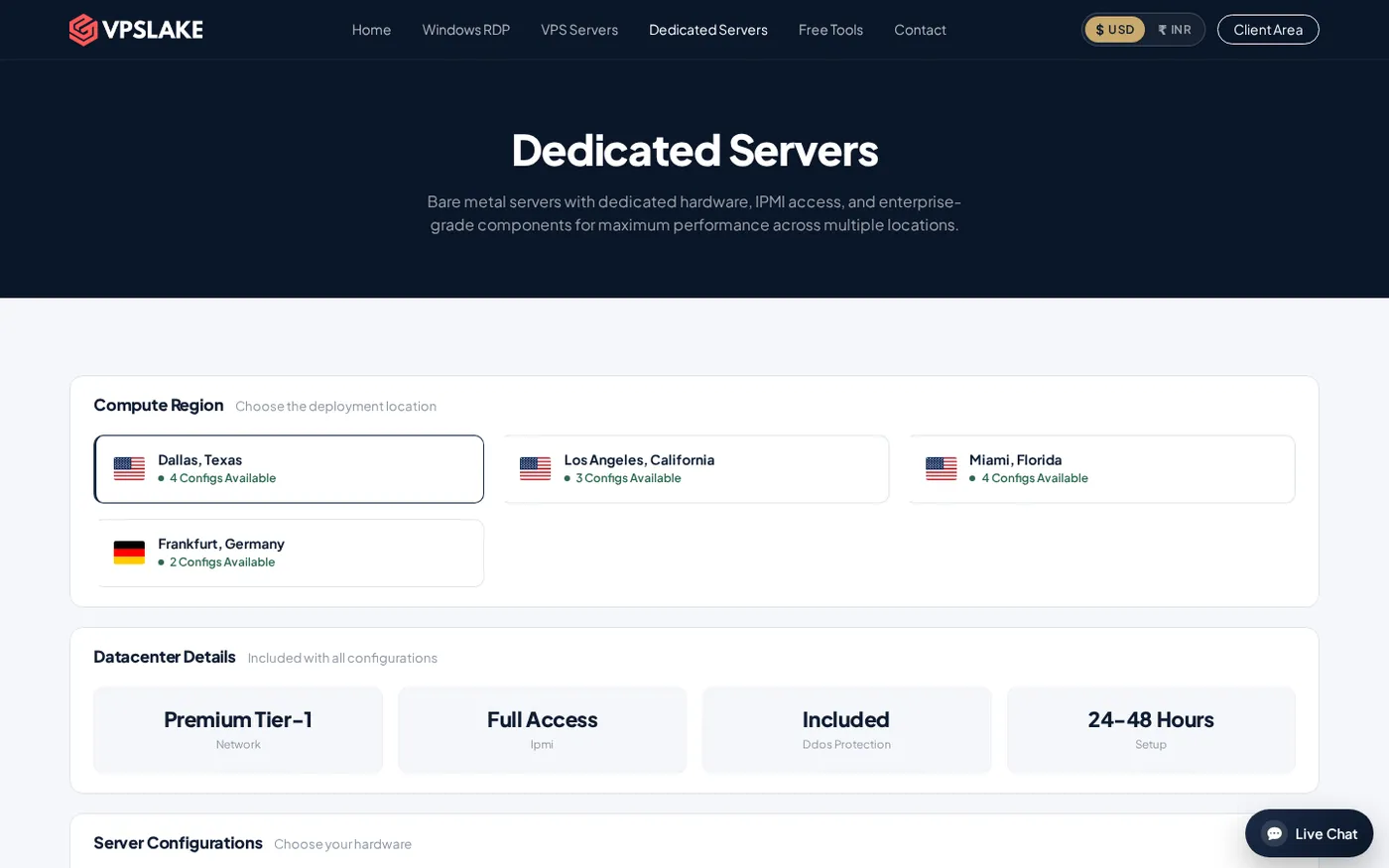
Success looks like the provider confirms the city, hardware, setup window, support route, and billing terms in writing.
Step 10: Pick the smallest tier that leaves useful headroom
Why this matters: a clear tier decision is easier to monitor and upgrade than an oversized server chosen from fear.
| Tier | Main specification | Best fit | Price |
|---|---|---|---|
| DS-1 | Ryzen 5 3600, 32 GB DDR4, 500 GB NVMe, 30 TB on 1 Gbps | First bare-metal box, game server, small hypervisor | $34.99/mo |
| DS-2 | Ryzen 7 5800X, 64 GB DDR4, 1 TB NVMe, 50 TB on 10 Gbps | Larger Minecraft network, database | $64.99/mo |
| DS-3 | Ryzen 9 5950X, 128 GB DDR4, 2x 1 TB NVMe, 100 TB on 10 Gbps | Many VMs, heavy builds | $99.99/mo |
| DS-4 | EPYC 7443P, 128 GB DDR4 ECC, 2x 1 TB NVMe, 100 TB on 10 Gbps | ECC workloads, virtualization host | $129.99/mo |
Start with DS-1 if you are moving from a VPS and need a whole machine without a large database or VM fleet. Choose DS-2 when memory, storage, and parallel demand are clear. DS-3 suits heavier multi-VM or build work, while DS-4 fits designs where ECC memory and server-class CPU features are central.
Success looks like you can explain why your selected tier is necessary and what measurement would trigger an upgrade.
Step 11: Calculate the complete monthly cost
Why this matters: the server price is only one part of the decision.
Check whether the quote includes IPMI, DDoS protection, traffic, IPv4 addresses, setup, backups, a control panel, and support. Also check taxes, payment fees, storage, software licences, and backups. Compare administration work on both sides when comparing bare metal with a managed plan.
Success looks like a monthly total with no “to be confirmed” line items that could change your decision.
Step 12: Verify the plan before you pay
Why this matters: a final written confirmation prevents a mismatch between a marketing card and the server you receive.
Send the provider a checklist: exact CPU, RAM type and amount, drive count and usable capacity, RAID level, port and traffic, IP allocation, location, IPMI, DDoS scope, setup time, backup responsibility, and renewal price. Save the answer with your order details.
If your requirements are still below dedicated-server scale, compare them with our MT4/MT5 VPS requirements guide before upgrading. If they fit DS-1 or a larger tier, contact VPSLake with the workload summary so the correct configuration can be confirmed.
Success looks like the delivered server matches the checklist and your monitoring is collecting CPU, RAM, disk, network, and application metrics from day one.
Common mistakes when choosing a dedicated server
- Choosing core count without checking single-thread performance.
- Treating raw disk capacity as usable RAID capacity.
- Assuming RAID replaces an independent backup.
- Paying for a fast port without checking the traffic policy.
- Ignoring IPMI until a firewall or boot problem occurs.
- Selecting RAM with no allowance for the hypervisor, cache, or growth.
- Buying based on a generic CPU family name instead of the exact model.
FAQ
How much RAM do I need for a dedicated server?
Add the operating system, each application or VM, cache, and growth headroom. A server with 32 GB can suit a first bare-metal box, while 64 GB or 128 GB is more appropriate for larger databases, multiple VMs, or heavier build workloads.
Is NVMe better than SSD for a dedicated server?
NVMe usually offers a better fit for high-I/O workloads such as databases, VM disks, and build directories because it uses PCIe storage. Capacity, endurance, RAID layout, and backups still matter; a faster disk does not compensate for a poor data-protection plan.
Do I need ECC RAM on a dedicated server?
ECC is worth prioritizing for databases, virtualization, and long-running production services because supported systems can detect and correct some memory errors. It is a reliability feature, not a replacement for monitoring and tested backups.
What is IPMI used for?
IPMI is out-of-band server management. It can let you view hardware status, control power, open a remote console, or attach virtual media even when the operating system or SSH is unavailable.
Is a dedicated server better than a VPS?
A dedicated server is better when you need all physical CPU, RAM, storage, or network capacity and want to run several workloads on one machine. A VPS is usually simpler and more economical for smaller workloads, so compare measured usage before moving to bare metal.